ZSK StickmaschinenAuto-Digitizing Deutsch Sign in Try it free

Automatic digitizing in the browser

From logo to embroidery file – automatically, in minutes

Auto-Digitizing turns your logo or artwork into a ready-to-stitch file for your embroidery machine. Upload the image, check the preview, download as .Z00 or .DST. No installation, right in the browser.

Try it freeHow it works

A service by ZSK Stickmaschinen. Your first conversions are free.

InputPNGJPEGSVGAIPDFEPS
Output.Z00.DSTfor ZSK machines and nearly all other embroidery machines

What is Auto-Digitizing?

Auto-Digitizing is an online service by ZSK Stickmaschinen that converts images into embroidery files automatically. In embroidery this step is called digitizing or punching and is normally done by hand in digitizing software.

The program detects the colours and areas of the design, chooses a suitable stitch type for each area, adds underlay, plans the stitching order and places trims. The result is a ready-to-stitch draft that you check in the preview and refine area by area where needed.

Three steps to your embroidery file

  1. 1

    Upload an image

    PNG, JPEG, SVG, AI, PDF or EPS. Vector files or PNGs with a transparent background work best.

  2. 2

    Check size and colours

    Set the width in millimetres, merge colours or switch them off, choose the material. All values have sensible defaults.

  3. 3

    Download the embroidery file

    Look at the preview, refine if needed and download as .Z00 or .DST.

What Auto-Digitizing can do

From the first draft to the finished file, all in one window.

Preview down to the single stitch

The stitch preview shows every stitch, the “Realistic” view shows the embroidery with thread sheen on the chosen fabric. Zoom with the mouse wheel down to the single thread. The simulation plays the stitching order stitch by stitch.

  • Stitch count, colour changes, trims and stitching time at a glance
  • Jumps and connecting stitches visible
  • Warning when lettering is too small
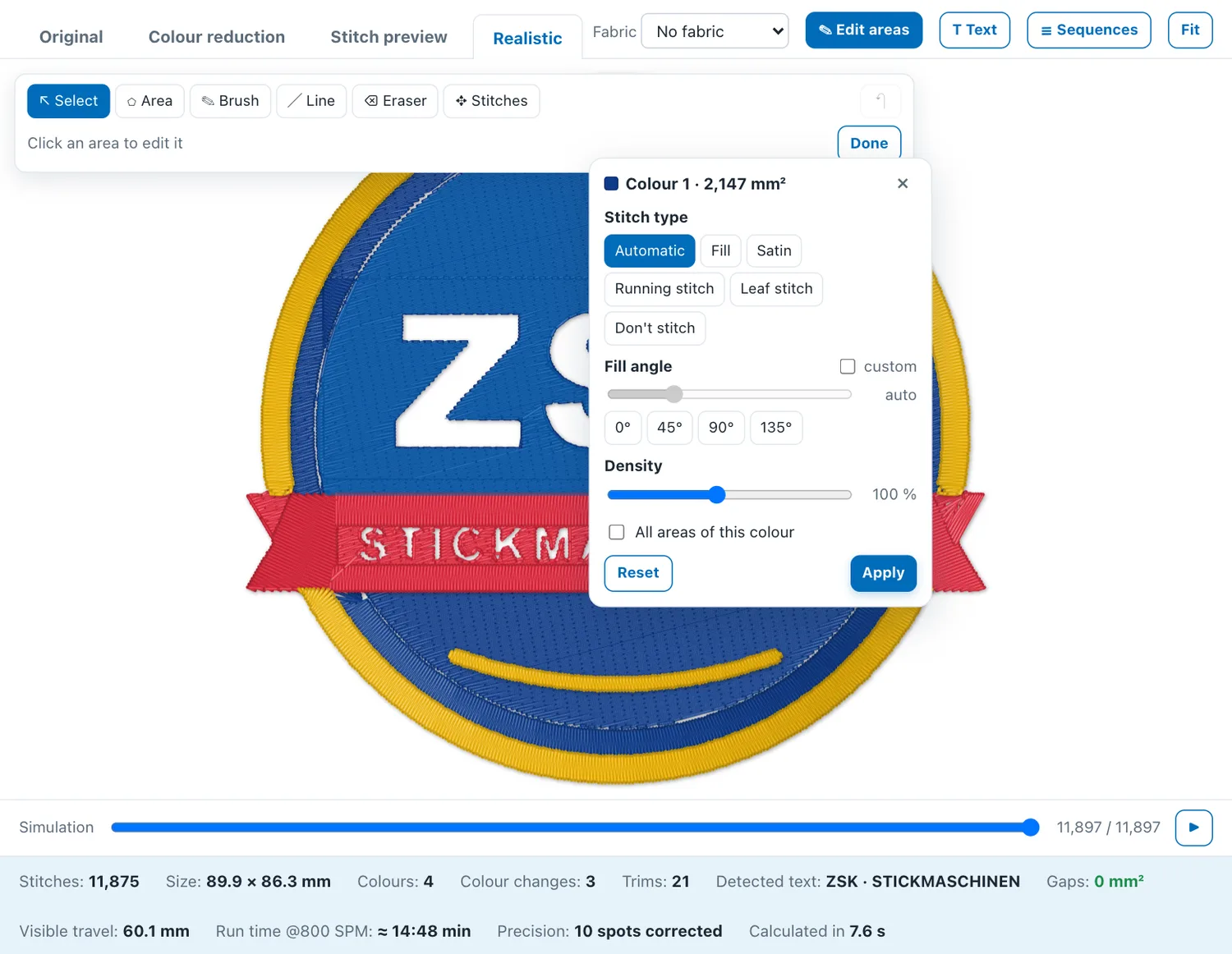
Editor with the area menu open

Editor: change any area by hand

Click an area to open its menu: stitch type, fill angle and density can be set per area. Draw new areas, lines and text straight into the design.

  • Fill, satin, running stitch, leaf stitch
  • Text with embroidery fonts, also on an arc
  • Arrange stitching order and colours in the sequence list
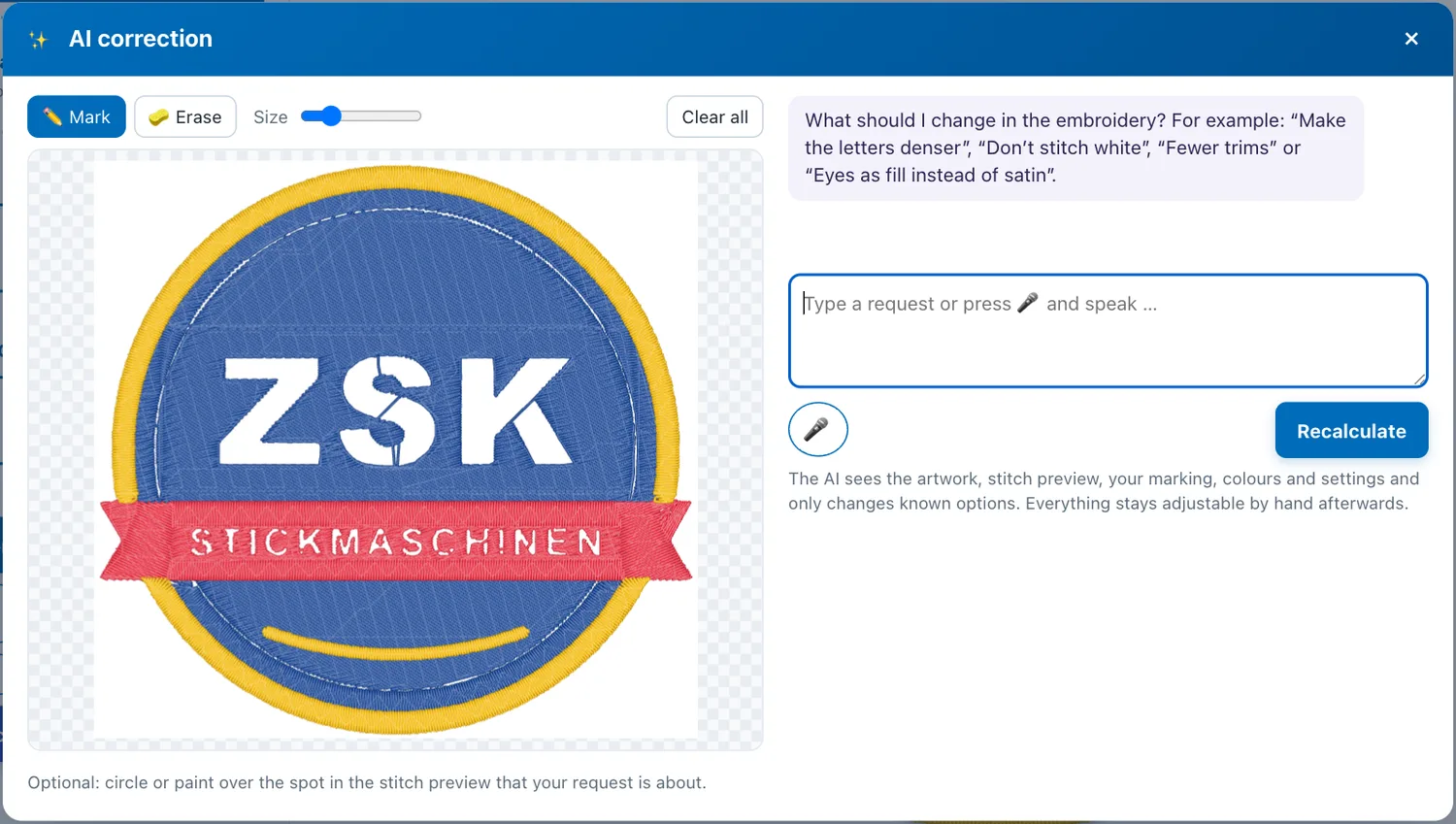
AI correction dialog

AI correction: just say what should change

Describe your wish in your own words, typed or spoken, for example “Don’t stitch white” or “Make the letters denser”. The AI adjusts the settings and recalculates the embroidery.

  • Circle the spot in the embroidery you mean
  • No technical terms needed
  • Every change is explained
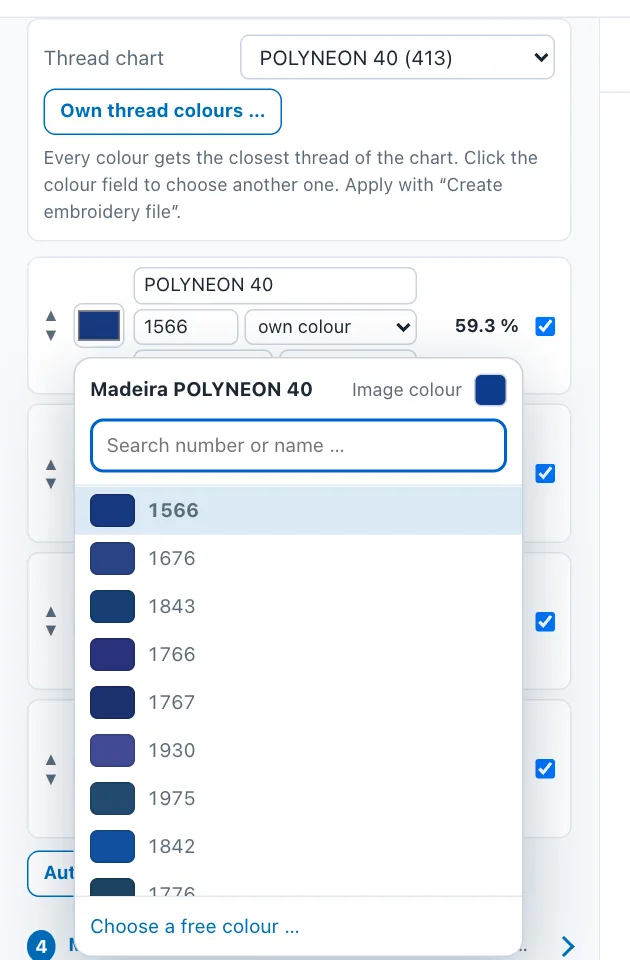
Thread list of a thread chart

Real thread colours with thread numbers

Choose a thread chart and every image colour automatically gets the closest thread. Thread name and thread number are then written into the .Z00 file.

  • 27 thread charts with about 11,500 colours
  • Madeira, Gunold, Amann Isacord and more
  • Add your own thread colours

Material presets

Presets for common fabrics set density, underlay and pull compensation to match.

Precision Mode

Compares the embroidery with the artwork and corrects deviations automatically.

Save projects

Save the design with all settings as a project file and continue later.

German and English

Interface and guide in both languages.

Who is it for?

  • Embroidery shops and garment decorators who need logos ready to stitch quickly
  • Teamwear suppliers and promotional product dealers with many simple designs
  • Businesses that want to quote with a realistic preview before digitizing
  • Users of ZSK machines who work directly in the .Z00 format

What the automation does not replace

Logos, lettering and flat artwork with clear colours work best. Photos, gradients and very fine details are unsuitable or need rework. Check the preview and stitch a sample before a production run.

Pricing: credits instead of a subscription

You pay per conversion, not per month.

1 conversion = 1 credit

A credit is only charged when you download the embroidery file. Trying out and refining costs nothing.

Re-export for 7 days

You can change the same design and download it again as often as you like for seven days, without another credit.

Your first conversions are free

After your first sign-in you receive starter credits. Buy more credits as a package right in the application.

Current packages: Punch Paket S 10 Credits · Punch Paket M 25 Credits · Punch Paket L 100 Credits

Frequently asked questions

What is Auto-Digitizing?

Auto-Digitizing is an online service by ZSK Stickmaschinen. It converts an image into an embroidery file automatically, a step known as digitizing or punching. It runs in the browser, no installation is needed.

Which files can I upload?

PNG, JPEG, SVG, AI, PDF and EPS, plus GIF, BMP, WebP and TIFF. Vector files or PNGs with a transparent background, cropped to the design itself, work best.

Which embroidery formats do I get?

The ZSK format .Z00 with colours, thread names and thread numbers, and the .DST (Tajima) format that nearly every embroidery machine reads. DST does not store colours.

What does a conversion cost?

One conversion costs one credit. It is only charged when you download the embroidery file. After that you can re-export the same design free of charge for seven days. Your first conversions are free, further credits are sold as packages.

Do I need an account or a password?

You sign in with your e-mail address and receive a sign-in link, there is no password. The account is created automatically. After your first sign-in you enter your name and address once.

Can I edit the result?

Yes. In the editor you change stitch type, angle and density of every area, draw new areas and lines, add text with embroidery fonts, arrange the stitching order and edit single stitches.

How good is the result compared with digitizing by hand?

For logos, lettering and flat designs you get a ready-to-stitch draft within minutes. Photos, gradients and very fine details are unsuitable or need rework. Check the preview and stitch a sample before a production run.

Does it only work with ZSK embroidery machines?

No. The .Z00 format is meant for ZSK machines, the .DST format is read by nearly all embroidery machines of other manufacturers.

Which thread colours are available?

27 thread charts with about 11,500 colours, including Madeira Polyneon and Classic, Gunold Poly and Sulky, and Amann Isacord. You can also add your own thread colours.

Try it with your own logo

Sign in, upload an image, look at the preview. Your first conversions are free.

Try it freeGuide